
Getting verified is one of the most important steps when using any online platform, and MegaBet KYC plays a key role in ensuring a safe and secure experience. Without completing verification, users may face restrictions, especially when it comes to withdrawals and account access.
Many users experience delays not because the process is difficult, but because of small errors that could have been avoided. The good news is that with the right approach, you can complete your verification quickly and without stress.
In this guide, you’ll learn proven tips to help you pass the MegaBet KYC process faster while avoiding the most common mistakes that cause delays.
MegaBet KYC Requirements (Quick Overview)
Before starting your verification, it’s important to understand what information and documents are required. Preparing everything in advance will make the process much smoother.
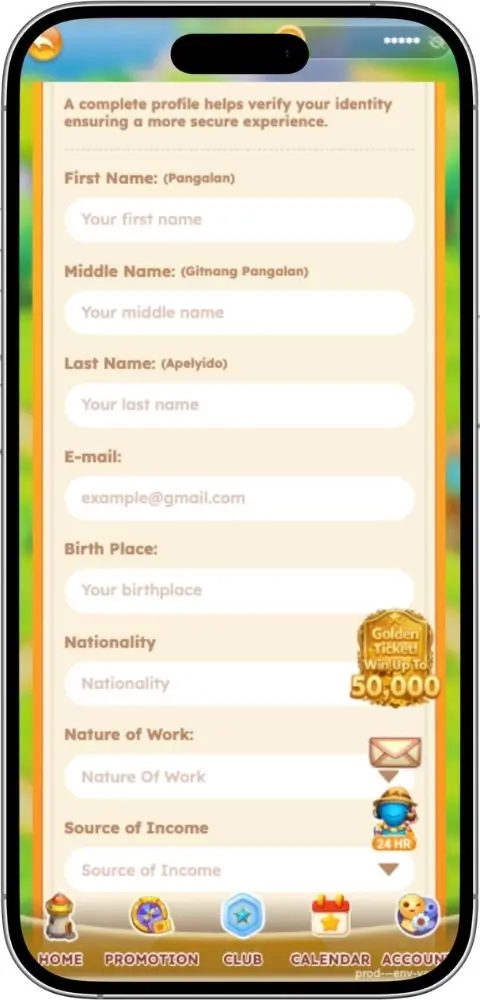
Basic Information Required:
- Full Name (First, Middle, Last)
- Email Address
- Birthplace
- Nationality
- Nature of Work
- Source of Income
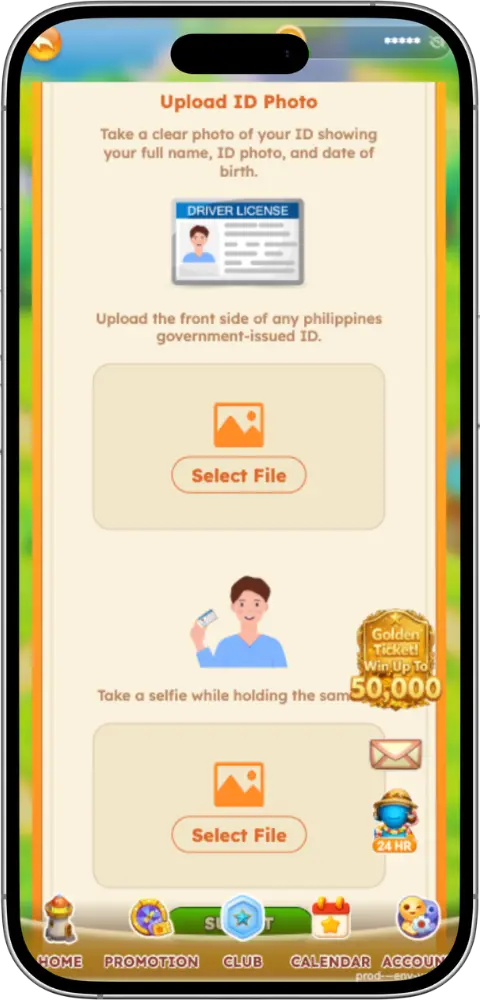
Documents You May Need:
- Valid government-issued ID
- Proof of address (if required)
- Selfie verification
Quick Checklist:
- Ensure your ID is not expired
- Make sure all details match your documents
- Prepare clear and readable images
Completing your MegaBet KYC starts with proper preparation, which helps reduce the chances of rejection.
Step-by-Step MegaBet KYC Process
Understanding how the process works can help you avoid confusion and mistakes.
Step 1: Access the Verification Section
Log in to your account and go to the verification page.
Step 2: Fill Out Your Information
Enter your personal details carefully and accurately.
Step 3: Upload Documents
Provide the required ID and supporting documents.
Step 4: Complete Selfie Verification
If required, take a selfie holding your ID.
Step 5: Wait for Approval
After submission, your MegaBet KYC will be reviewed by the system or support team.
Proven MegaBet KYC Tips to Get Verified Faster
If you want faster approval, follow these practical tips:
Use Clear and High-Quality Images
Always upload photos that are sharp and well-lit. Avoid shadows and glare.
Match Your Personal Details Exactly
Your information must match your ID perfectly—no abbreviations or missing names.
Submit Valid and Updated Documents
Expired IDs are one of the main reasons verification fails.
Follow File Requirements
Use supported formats like JPG or PNG and ensure proper file size.
Complete Everything in One Attempt
A smooth MegaBet KYC submission is one where everything is done correctly the first time.
Common MegaBet KYC Mistakes to Avoid
Avoid these common errors that can delay your verification:
Blurry or Cropped Documents
If your ID is not fully visible, it will likely be rejected.
Incorrect Information
Even small spelling mistakes can cause issues.
Expired Documents
Always double-check validity before uploading.
Multiple Submissions
Submitting repeatedly can delay your MegaBet KYC instead of speeding it up.
How to Avoid KYC Delays
Speed depends not only on accuracy but also on how you submit your application.
Submit During Active Hours
Submitting during business hours may help your request get processed faster.
Double-Check Before Submitting
Take time to review your information carefully.
Use Stable Internet
A poor connection can interrupt uploads and cause errors.
Use a Good Camera
Clear images improve your chances of fast approval in MegaBet KYC.
What to Do If Your MegaBet KYC Is Pending
If your verification status is still pending, don’t worry—it’s usually part of the process.
Normal Waiting Time
Most applications are processed within a few hours to 1–2 days.
When to Follow Up
If it takes longer than expected:
- Check your email for updates
- Review your account status
Sometimes, MegaBet KYC delays are simply due to high volume.

How to Fix Rejected MegaBet KYC Applications
If your application gets rejected, you can fix it easily.
Common Reasons:
- Blurry images
- Mismatched details
- Incomplete documents
How to Fix It:
- Read the rejection message carefully
- Correct the issue
- Retake clear photos
- Resubmit properly
A corrected MegaBet KYC submission has a much higher chance of approval.
Quick Tips for First-Time Users
If you’re new to the process, these tips will help you succeed:
Do’s:
- Prepare everything before starting
- Use real and accurate information
- Follow instructions step-by-step
Don’ts:
- Don’t rush
- Don’t use fake documents
- Don’t ignore required fields
Taking your time ensures your MegaBet KYC goes smoothly.
Special Section: How to Fill Out the MegaBet KYC Form Correctly
Filling out the form correctly is one of the most important steps.
Full Name
Enter your full legal name exactly as it appears on your ID.
Email Address
Use an active and correct email address.
Birthplace & Nationality
Avoid abbreviations and match your official documents.
Nature of Work
Provide a clear description of your job.
Source of Income
State your main source of earnings honestly.
Important Reminder
All information entered will be checked, so accuracy is critical for successful MegaBet KYC approval.
Conclusion
Completing your verification doesn’t have to be difficult. By following the right steps and applying these tips, you can avoid delays and get approved quickly.
Key Takeaways:
- Prepare your documents in advance
- Ensure all details are accurate
- Avoid common mistakes
- Submit everything correctly the first time
With the right approach, your MegaBet KYC process can be fast, smooth, and stress-free—allowing you to enjoy the platform without interruptions.
Frequently Asked Questions
Yes, but it depends on the platform’s review stage. If your submission is still under review, you may need to wait for feedback before making changes. If it gets rejected, you’ll usually be given a chance to correct and resubmit your details.
In most cases, some bonuses or promotions may require completed verification before you can fully claim or withdraw winnings. Completing your KYC early helps avoid restrictions later on.
No, using the same ID for multiple accounts is typically not allowed and may result in account suspension. Each user should have only one verified account.
Not always. Most users only need to submit documents and a selfie. However, in some cases, additional verification like a video call may be requested for security purposes.
If you don’t complete verification, your account may remain limited. This can affect withdrawals, access to features, and overall account functionality.